Imagine you’re about to explore a huge abandoned building. You don’t just run inside randomly. You would first walk around, check the doors, peek through windows, understand the structure, and see which parts look weak or broken.
That first phase of collecting information before doing anything else is exactly what recon is in cybersecurity.
Whether you’re a bug bounty hunter or someone just entering the cybersecurity world, recon (short for reconnaissance) is the first phase of almost every attack, every penetration test, and every CTF challenge.
It’s not hacking. It’s understanding. It’s gathering the pieces before solving the puzzle.

Why Recon Matters
Most beginners jump directly into scanning for vulnerabilities, thinking that tools like Nmap or Burp Suite will instantly reveal weaknesses. Professionals don’t work like that. They know that before any scan, the first step is understanding the target. Proper recon helps them see the full attack surface, identify what’s exposed, and uncover details beginners often miss.
Professionals know one simple rule:
The more you know about your target, the easier it becomes to hack it.
Recon helps you uncover things the target might not even realize exist, such as:
- forgotten subdomains
- old servers
- outdated APIs
- development URLs
- exposed directories
- misconfigured services
And often… the real vulnerability is hiding behind something the company forgot about.

The Two Types of Recon You Must Know
In bug bounty and cybersecurity, recon is divided into two broad categories:
1. Passive Recon (Safe + No Interaction With Target)
This is where you gather information without directly touching the target.
You look from a distance.
Examples:
- Google search
- Public records
- GitHub leaks
- Shodan
- Censys
- Certificate Transparency logs
- DNS history tools
Passive recon is extremely powerful because it allows you to gather information without ever touching the target directly. It leaves no trace, it’s completely safe, and it often reveals details that beginners and even experienced attackers overlook. By studying publicly available data, you can uncover technologies, subdomains, leaks, and historical information that becomes invaluable later during active testing.
2. Active Recon (Direct Interaction With Target)
This is when you actively interact with the target’s servers. Instead of only observing public information, you start sending requests, probing endpoints, and analyzing responses to discover open ports, technologies, and potential vulnerabilities.
Examples:
- Scanning subdomains
- Checking open ports
- Enumerating directories
- Running API calls
- Fingerprinting technologies
This is where tools like nmap, dirsearch, httpx, subfinder, etc., come into the picture.
A Simple Real-Life Example of Recon
Let’s say you’re testing:
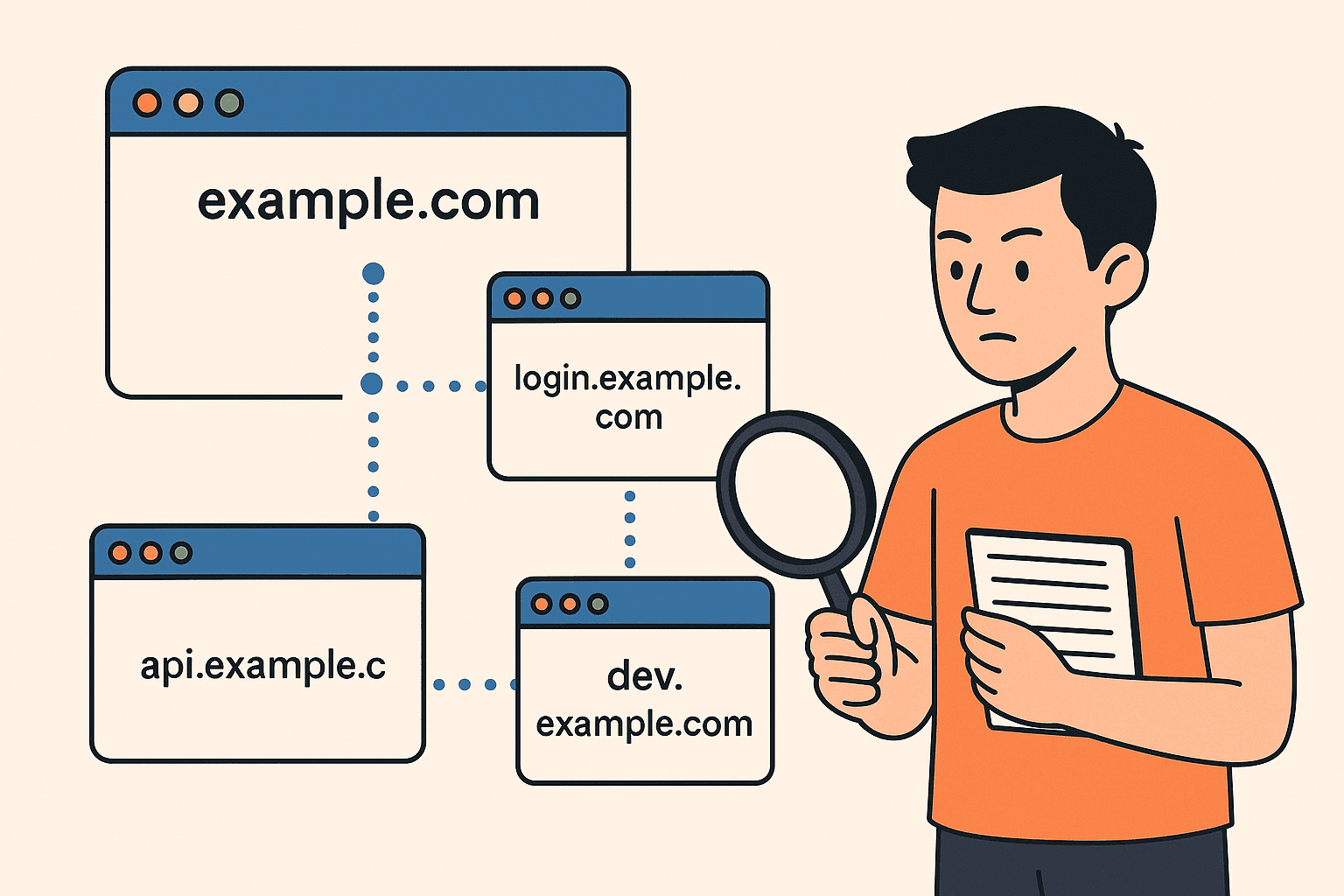
https://example.com
A beginner might only test the main website. But a researcher doing recon finds:
- login.example.com
- api.example.com
- billing.example.com
- dev.example.com (this one is dangerous)
- staging.example.com
- old-panel.example.com
Suddenly, instead of 1 target… you now have 6 additional attack surfaces.
Most vulnerabilities like:
- IDOR
- Misconfigured S3 buckets
- Leaked API keys
- Old admin panels
- Forgotten test environments
are found in these hidden places, not on the main website.
Recon exposes the doorway. Exploitation comes later.

Basic Recon Workflow for Beginners
If you’re new to bug bounty, here’s a simple recon flow you can follow.
Step 1: Identify the Scope
Before touching anything, check what the program allows.
Example (HackerOne scope style):
 *.example.com
 api.example.com
 support.example.com
This tells you exactly what you are permitted to test.
Step 2: Subdomain Enumeration
Subdomains open doors to hidden applications.
Tools commonly used:
 subfinder -d example.com -o subs.txt
 assetfinder --subs-only example.com >> subs.txt
These tools find subdomains that the company might forget about.
Step 3: Check Which Subdomains Are Alive Once you have a list, check which hosts actually respond.
httpx -l subs.txt -o alive.txt
Now you have a clean list of working endpoints to explore.
Step 4: Directory & File Enumeration Directories often contain juicy information.
Example tool:
dirsearch -u https://target.com -e php,txt,html
This finds secret pages like:
- /backup/
- /admin-old/
- /config.txt
Step 5: Technology Fingerprinting You need to understand what the website is built with.
Tools like:
- Wappalyzer
- BuiltWith
- WhatWeb
help you identify:
- Frameworks
- Versions
- Database types
- CDNs
- Server software
This is important because each technology has its own known vulnerabilities.
Step 6: Google Dorking (Passive Recon Example)
Sometimes Google reveals things the website hides.
Example:
 site:example.com filetype:env
 site:example.com inurl:admin
 site:example.com confidential
You'd be surprised how often .env files and internal documents show up.
What Beginners Often Do Wrong in Recon
Many beginners think recon is just running a few tools and waiting for results. But real recon is a mindset, not a list of commands. The biggest mistakes new hackers make come from treating recon as a quick step instead of a deep discovery process.
Most beginners stop after scanning the main website. They don’t check APIs. They ignore Android or iOS app endpoints. They skip checking GitHub for exposed code. They rely only on automated tools. And they never take time to understand the business logic behind the target.
All of this leads to shallow results and missed vulnerabilities.
Recon is not a tool. Recon is curiosity — the ability to look deeper, question everything, and explore beyond what is visible on the surface.
The Goal of Recon (In One Sentence)
Find things the developers forgot about.
Mini Recon Code Example (Checking Open Ports)
Here’s a quick recon command you might see in real bug bounty work:
nmap -sC -sV -Pn -p- example.com
This scans all ports and fingerprints services.
Sometimes one open port like 8080 or 8443 reveals a hidden admin dashboard.
Story Time: Why Recon Wins Bug Bounties
YImagine two hunters testing the same target.
Hunter A
Immediately starts testing the main website — clicks, scans, tries payloads.
Hunter B
Spends 2 hours doing recon. Finds a forgotten subdomain:
dev-dashboard.example.com
This subdomain contains an outdated version of the application with weak authentication.
Hunter B reports a critical vulnerability. Hunter A finds nothing.
Who wins? The one who did recon.
This happens every day in bug bounty.
Why “Recon” Is More Than Just Bug Bounty
Recon plays a critical role far beyond bug bounty hunting. It is a core phase in almost every area of cybersecurity. Red teamers rely on recon to map corporate environments. OSINT analysts use it to uncover publicly exposed information. Penetration testers use it to profile systems before exploitation. Even malware operators and digital forensics teams depend on recon to understand their targets and environments.
From CTF competitions to real-world cyber operations, every successful engagement begins with recon.

